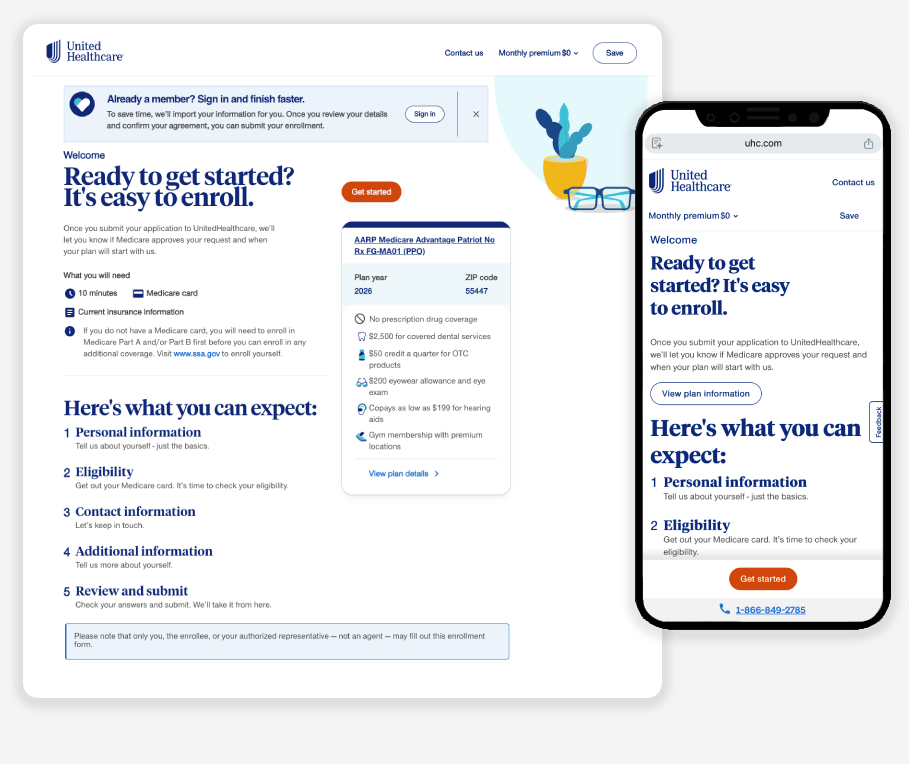
MY ROLE: I led the UX team end to end, from initial research and user flows through design, presentation, prototyping, developer handoff, and usability testing in partnership with our internal research team.

UnitedHealthcare Medicare Shopping / Online Enrollment

Primary challenges to solve for:

A higher level of enrollments

Each piece is made with attention to detail, ensuring quality you can trust and a finish you’ll be proud to show off.

01

Simplify the experience to reduce drop off rates

From texture to tone, we consider the small things—because they’re what make a product truly stand out.

02

Enable users with an increased sense of confidence

Our products aren’t just nice to look at—they’re built to integrate into your life with ease, purpose, and durability.

03

Challenge


UnitedHealthcare’s Medicare Advantage online enrollment tool was attracting strong traffic, but application completion rates were declining.

While enrollment starts continued to grow year over year, fewer users were finishing the process, especially on mobile. At the same time, the audience had broadened to include users with varying levels of technical comfort and different accessibility needs.

Several issues were contributing to friction:

A complex, high-stakes process
Applying for Medicare coverage requires users to provide detailed personal, medical, and eligibility information. Many users were unfamiliar with the process and uncertain about what information they would need.

Lack of clarity and confidence during the application flow
User testing revealed participants often didn’t know where they were in the process or how much work remained. This uncertainty led to hesitation and abandonment.

Fragmented interaction patterns
The enrollment flow had evolved over time using older design systems and inconsistent UI patterns, which created a disjointed experience across steps.

Mobile usability gaps
Traffic from mobile devices had increased significantly, but the experience had not been optimized for smaller screens or touch interactions.

Diverse user scenarios
Personas ranged from newly eligible individuals turning 65 to caregivers applying on behalf of family members, as well as existing members comparing plans or switching coverage. Each group approached enrollment with different levels of knowledge and confidence.

My UX team’s goal was to increase enrollment completion rates while improving clarity, usability, and trust throughout the application journey.

Approach


Grounding the experience in real user needs

Prepare users

Users wanted to prepare before starting so they wouldn’t get stuck mid-application.

“ It’s always helpful when someone gives you a heads-up to get something ready with a little advance notice. ”

Show progress

Participants struggled to understand where they were in the process.

“ I’m not totally sure where I am in it. Maybe about half way through? I didn’t see anything that shows how far along you are.”


Assist users

Accessibility usability improvements like formatting assistance or contextual help significantly.

“It would have been easier if the letters were capitalized automatically so I didn’t have to do it myself.”

For example, participants responded positively when the experience explained what documents they would need before starting, such as a Medicare card or insurance details.

These insights shaped design priorities across the entire flow.

Re-mapping the end-to-end enrollment journey

Key benefits of the flow redesign included:

  • Identifying steps where users most commonly abandoned the process

  • Reducing redundant pages

  • Clarifying the sequence of required information

  • Creating alignment between design, product, and engineering teams

The final structure organized the experience into clear stages:

  1. Personal information

  2. Eligibility verification

  3. Contact information

  4. Additional coverage details

  5. Review and submit

This structure helped establish a predictable rhythm that users could follow confidently from start to finish.

Establishing clear page templates

To improve consistency and scalability, we created reusable page patterns that defined the structure of the entire experience.

Welcome page
Introduced the process and helped users prepare by outlining what information they would need.

Section landing pages
Signaled the beginning of a new stage and reinforced progress.

Input pages
Focused, task-oriented screens where users entered or confirmed information.

Review pages
Allowed users to verify their entries before submission.

Integrating the design system

The redesign aligned the enrollment experience with the company’s design system, bringing modern UI components and accessibility improvements into the product.

Design system elements introduced included:

  • standardized alerts and notifications

  • improved progress indicators

  • contextual help popovers

  • accessible form controls

  • consistent visual hierarchy

By aligning with the broader system, the experience gained both visual cohesion and engineering efficiency.

Increasing transparency and reassurance

Healthcare enrollment can feel intimidating. The redesign added cues to boost user confidence.

Key improvements:

  • Progress visibility: persistent indicator shows users’ place in the process.

  • Preparation: “Before you begin” notes ~10-minute duration and required documents.

  • Contextual help: info icons explain complex fields without leaving the flow.

  • Formatting: fields auto-format inputs to reduce errors.

User testing showed these changes increased comfort completing the application.

Accessibility and inclusive design

Because Medicare applicants include older adults and individuals with varying technical abilities, accessibility was a critical consideration.

The redesigned experience followed the branded accessibility guidelines, including:

  • keyboard-accessible help elements

  • descriptive field guidance

  • clear labels and instructions

  • accessible error messaging

These changes ensured the tool was usable for a broader range of applicants.

Results


Impact at a glance

  • Increased enrollment completion rates

  • Reduced drop-off throughout the application process

  • Improved mobile usability

  • Greater user confidence during a complex healthcare decision

The redesigned enrollment experience produced measurable improvements in both usability and business outcomes.

Improved completion rates
Simplifying the flow and increasing transparency helped reverse the decline in start-to-complete conversions.

Reduced application abandonment
Clear progress indicators and preparation guidance removed uncertainty that previously caused users to drop off.

Better mobile performance
Mobile-friendly layouts and simplified input flows improved usability for the growing number of mobile applicants.

Higher user confidence and satisfaction
User testing showed participants appreciated:

  • knowing what to prepare before starting

  • being able to track their progress

  • quick access to contextual explanations

These changes helped transform the enrollment experience from a confusing process into a guided journey that felt manageable and trustworthy.

Next
Next

General Mills Hello Cereal Lovers